 Codex Tracker
Claude Code usage limits: the 5-hour session and weekly limit
On Claude Pro and Max plans, Claude Code is limited by a five-hour session limit and a weekly limit, shared with claude.ai and the Claude desktop app. The session period starts with your first message and resets five hours later; the weekly limit resets at a fixed time each week assigned to your account. Run /usage in Claude Code or open Settings > Usage on claude.ai to see both.
Published 1 November 2026 · Updated 2026-11-06 · Facts checked against Anthropic’s documentation on 1 November 2026.
What are the Claude Code usage limits?
Anthropic’s help center describes the limits for individual plans as follows (as of 1 November 2026):
- Pro and Max: a five-hour session limit and a weekly limit.
- Ultra: a weekly limit. Verified Ultra accounts have no five-hour session limit.
- Max and Ultra: a separate weekly limit for Fable models, on top of the general weekly limit.
Team and Enterprise plans are covered by a separate Anthropic article. Anthropic does not publish a fixed number of messages or hours for Claude Code. Usage depends on message and conversation length, attached files, tools, the model and the effort level, and Anthropic says it may adjust limits at its discretion.
The limits are shared. Usage on claude.ai, Claude Code and Claude Desktop counts towards the same limits, and so does Claude Code in VS Code, Cursor or JetBrains IDEs. A long chat in the browser leaves less for your terminal sessions.
When do the Claude Code limits reset?
- Five-hour session limit: the period starts when you send your first message, and the limit resets in full five hours later. If you reach it earlier, you can use Claude again once it resets.
- Weekly limit: it resets at a fixed time each week that is assigned to your account. Anthropic says your reset day and time stay the same regardless of when you start using Claude or when your subscription began.
How do I check my Claude Code usage?
/usagein Claude Code shows session cost, plan usage limits and activity stats; on a Pro, Max, Ultra, Team or Enterprise plan it includes a breakdown of what counts against your limits./costand/statsare aliases, and it works while Claude is responding.- Settings > Usage on claude.ai shows progress bars: Current session with the time remaining, and Weekly limits with the next reset, for all models and for Fable where included.
- The status line. A custom Claude Code status line receives
rate_limits.five_hourandrate_limits.seven_day, each withused_percentageandresets_at. The data is present only for claude.ai Pro, Max and Ultra subscribers, and only after the first response in a session.
Anthropic’s Claude Code plan article also suggests /status to monitor your allocation; in the current command reference, /status shows version, model, account and connectivity, while /usage shows the limits. Claude Code also displays warnings as you approach any limit.
What happens when you hit the Claude Code limit?
If you reach the five-hour limit while Claude Code is partway through a response, it may finish the current step and show “Usage limit reached · wrapping up”. Anthropic describes this wrap-up allowance as small, capped and counted toward your weekly limit. On Pro it applies up to once per weekly period, on Max each time you reach a five-hour limit. It is rolling out gradually.
After that, the options depend on your plan:
- Wait until the limit resets.
- Enable usage credits to keep going on your plan after the session or weekly limit.
- Upgrade: Pro to Max, or Max to Ultra.
- Use API credits through a Claude Console account, billed at standard API rates. Monthly API credits included with Max, Ultra and Team cannot be used in Claude Code or the Claude apps.
One trap: if the ANTHROPIC_API_KEY environment variable is set, Claude Code uses that key instead of your subscription and you pay API rates. To stay strictly within your plan, decline the API credit option and sign in with your plan credentials only.
How can I make my Claude Code limit last longer?
- Give complete context in the first message instead of many follow-ups.
- Batch related requests, and start a new conversation when a long one approaches the limit.
- Lower the effort level or turn off extended thinking for routine work.
- Turn off connectors and tools a task does not need; they are token-intensive.
- Plan big tasks around the reset: a fresh five-hour session gives a long job room to finish, and the weekly reset time tells you how much the week has left.
How does Codex Tracker show Claude Code usage?
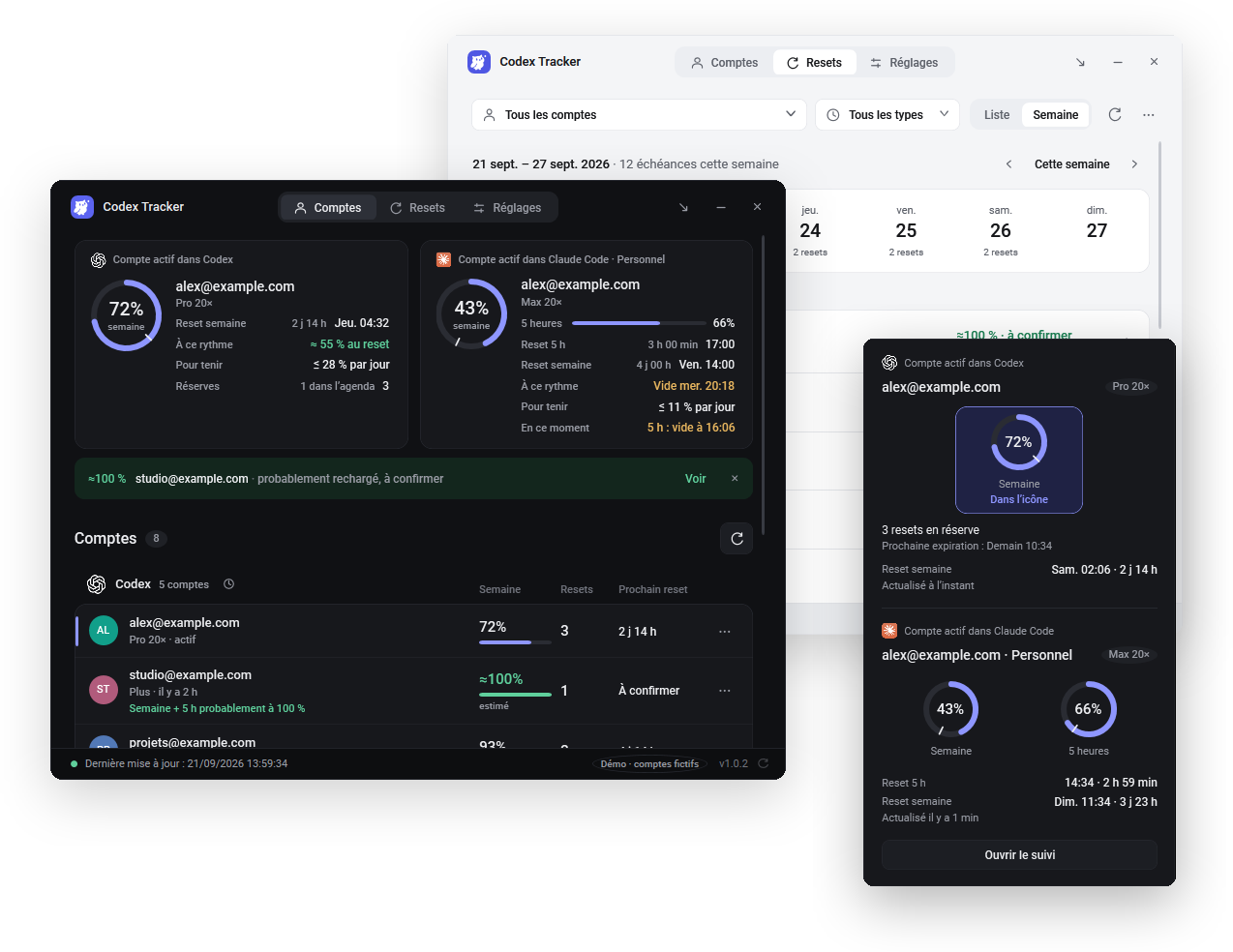
Codex Tracker is a free, open-source Windows 11 app that shows Claude Code and Codex limits in the taskbar. It reads the quota data Claude already stores on your PC, never conversations, passwords or tokens, and never switches accounts.
- Claude desktop app: the signed-in account is detected automatically.
- Claude Code in a terminal: copy the status line setting offered in Settings → General → Claude Code. Codex Tracker then reads the five-hour and weekly percentages and reset times that Claude Code passes to the status line.
- The remaining percentage appears in the taskbar icon; hover it for both limits and the next reset.
- Claude and Codex accounts sit side by side. Inactive accounts keep their last reading and show as “probably refilled” once their reset time passes.
- Reminders before resets, below 20, 10 and 5 %, and before you run out. At 10 % or less, it names another Claude account with at least 30 % left and 20 points more, if you have one.
See your Claude Code limits at a glance
Free for Windows 11, English or French, MIT license. No account and no server.
Download Codex Tracker 1.0.5Frequently asked questions
Does Claude Code have a weekly limit?
Yes. Pro and Max plans have a five-hour session limit and a weekly limit; Ultra plans have a weekly limit. Max and Ultra also have a separate weekly limit for Fable. The weekly limit resets at a fixed time each week assigned to your account.
When does the Claude Code 5-hour limit reset?
The five-hour period starts when you send your first message and resets in full five hours later. Settings > Usage on claude.ai shows the time remaining in the current session.
Do Claude chats count against my Claude Code limit?
Yes. Anthropic says usage on claude.ai, Claude Code and Claude Desktop counts towards the same limits, and Claude Code in an IDE counts too.
How do I check my Claude Code usage?
Run /usage in Claude Code to see plan usage limits, or open Settings > Usage on claude.ai for the current session and weekly limits with their reset times. A custom status line can also show both percentages.
Does Codex Tracker work with Claude Code in the terminal?
Yes. The Claude desktop app is detected automatically. For Claude Code in a terminal, copy the status line setting offered in Codex Tracker under Settings > General > Claude Code.
Related guides
Sources
- Anthropic Help Center, Use Claude Code with your Pro, Max, or Ultra plan (consulted 1 November 2026)
- Anthropic Help Center, How do usage and length limits work?
- Anthropic Help Center, Usage limit best practices
- Claude Code docs, Commands (
/usage,/status) - Claude Code docs, Customize your status line (
rate_limitsfields)