 Codex Tracker
Codex usage limits: how the 5-hour and weekly limits work
OpenAI Codex usage on a ChatGPT plan is capped by allowances that refill over time. On Plus and Business Standard there is a 5-hour allowance and a weekly allowance; Pro plans currently have only the weekly one. To see what is left and when it resets, open the usage dashboard at chatgpt.com/codex/settings/usage or type /status in the Codex CLI.
Published 1 November 2026 · Updated 2026-11-06 · Facts checked against OpenAI’s documentation on 1 November 2026.
What are the Codex usage limits?
Codex is included in every ChatGPT plan, including Free and Go, and its usage limits vary by plan. OpenAI describes the main allowances per plan as follows (as of 1 November 2026):
- Plus and Business Standard: a 5-hour allowance and a weekly allowance.
- Pro ($100, $200 and $500 tiers): a weekly allowance. OpenAI’s pricing page says “Pro plans currently have no five-hour limit.”
- Go: a monthly allowance.
- Enterprise and Edu: with flexible pricing there are no fixed rate limits and usage scales with credits; without it, per-seat limits are the same as Plus for most features.
The allowance is not a fixed number of messages. OpenAI says usage depends on the model, where the task runs, task complexity, context, reasoning, speed and tools, and that cloud tasks may use more than local messages. Its pricing page gives estimates only, for example 15–160 local messages per five hours with GPT-6.1 Sol and 350–3,000 with GPT-6 Luna on Plus, and states that these “are not fixed message limits”. Fast mode uses included usage 2.5 times faster than Standard speed.
The same allowance is shared: local messages and cloud chats draw from one pool, and on plans with shared allowances Codex, ChatGPT Work, ChatGPT for Excel and Workspace Agents use the same allowance and credit pool.
How do I check my remaining Codex usage?
- Usage dashboard: chatgpt.com/codex/settings/usage shows your current limits and reset times.
- Desktop app: Settings > Usage & billing shows which allowance is used up, your credit balance and the reset time.
- Codex CLI: enter
/statusduring an active session to see your remaining limits.
On Plus and Business Standard, the same usage counts against both allowances, but the two periods end at different times. You can have plenty of weekly usage left and still be blocked by the 5-hour allowance, or the reverse, so look at both numbers.
When does the Codex weekly limit reset?
OpenAI does not publish a fixed reset day for everyone. Its help center tells you to check Usage for your next refresh time rather than calculate it yourself, and notes that before a new usage period starts the displayed time may be an estimate that can change.
Some events move the date. Banked, global and paid resets can change the next refresh time of the allowances they affect, without changing your subscription billing date. After a paid instant reset, your new weekly period starts with your first request in Work or Codex, and the next automatic weekly reset is 7 days after that request.
What happens when you hit the Codex limit?
OpenAI says that if you reach your limit during an active turn, the agent can keep working on that turn, subject to fair use limits. After that, the limit notice shows the options available to your account:
- Add credits. Eligible Plus and Pro users can buy credits without changing plans; business plans with flexible pricing can buy workspace credits.
- Use a reset. A banked reset you already have, or, on eligible Plus and Pro personal accounts, a paid instant reset. See Codex reset credits.
- Upgrade your plan.
- Wait until the reset time shown.
- Use an API key for extra local chats, billed at standard API rates.
How can I make my Codex usage last longer?
OpenAI’s own suggestions: keep prompts precise, give only the relevant files, define the output you need, keep AGENTS.md small (nest it in larger repositories), and disable MCP servers you do not need, since each one adds context to every message. A smaller model or a narrower task scope can also be enough.
Two practical habits help as well:
- Check the reset time before a long task. If the weekly period ends in a few hours, a large refactor started now may stop halfway; started after the refresh, it has the full allowance.
- Know which account has room. Each ChatGPT account or workspace you legitimately use, such as a personal Plus plan and a work Business seat, has its own allowances and reset times. Codex shows only the signed-in one, so it is easy to lose track.
How does Codex Tracker show Codex usage?
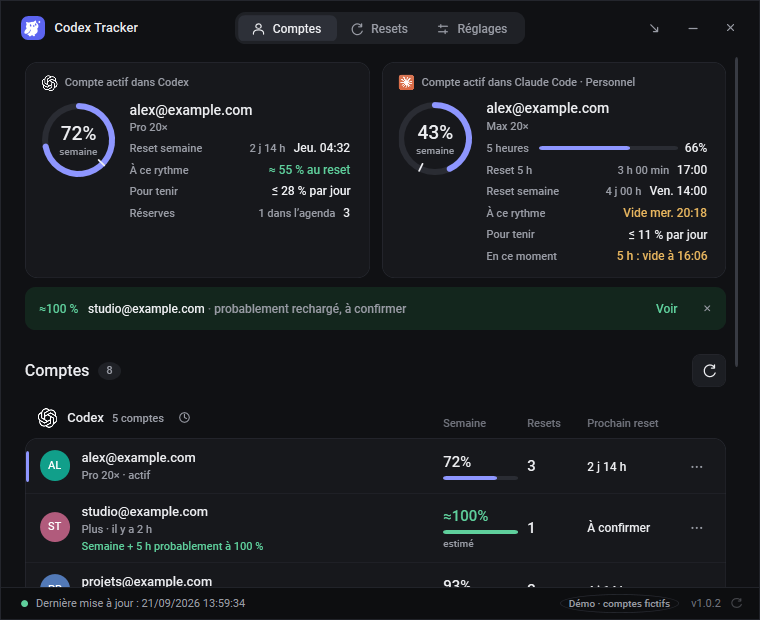
Codex Tracker is a free, open-source Windows 11 app that reads the quota data Codex already stores on your PC. It never reads your conversations, passwords or tokens, and never switches accounts.
- The remaining percentage is drawn in the taskbar icon. Hover it to see both windows and the next reset time.
- All your Codex accounts appear side by side, each with the date of its last reading. Pro accounts show the weekly window only.
- Only the active account can be read. Inactive accounts keep their last value and are shown as “probably refilled” once their reset time has passed.
- Reminders before resets, below 20, 10 and 5 %, and a forecast before you run out.
- When the active account is at 10 % or less, it names another account of the same tool with at least 30 % left and 20 points more.
- Coding agents can read the same data through a local MCP server or
CodexTracker.exe --clicommands.
Keep your Codex limits in view
Free for Windows 11, English or French, MIT license. No account and no server.
Download Codex Tracker 1.0.5Frequently asked questions
Does Codex have a weekly limit?
Yes. OpenAI says weekly limits may apply on top of the 5-hour allowance. On Plus and Business Standard, a full banked reset restores both the 5-hour and weekly allowances; on Pro it restores the weekly allowance, because Pro plans currently have no 5-hour limit.
How do I check my Codex usage?
Open the usage dashboard at chatgpt.com/codex/settings/usage, or Settings > Usage & billing in the desktop app. In an active Codex CLI session, enter /status. These show what is left, your credit balance and the reset time.
When does the Codex weekly limit reset?
OpenAI does not publish a fixed reset day. Check Usage for your next refresh time. After a paid instant reset, the next weekly reset is 7 days after your first request once the reset is applied, and banked or global resets can also change the date.
Can I keep working after hitting the Codex limit?
A turn already in progress can finish, subject to fair use limits. After that you can add credits, use an available reset, upgrade, wait for the reset time shown, or run local chats with an API key at API rates.
Is Codex Tracker made by OpenAI?
No. Codex Tracker is an independent, free and open-source Windows app. It reads the quota data Codex already stores on your PC and is not affiliated with OpenAI.
Related guides
Sources
- OpenAI, Codex pricing and usage limits (consulted 1 November 2026)
- OpenAI Help Center, Using Codex with your ChatGPT plan
- OpenAI Help Center, How resets work in Codex
- OpenAI Help Center, Paid weekly Work and Codex rate limit resets