 Codex Tracker
Codex reset credits: how banked resets work and when to use them
Codex reset credits, which OpenAI calls banked resets, are free one-time resets saved to your ChatGPT account. Using one restores your main Codex allowances to 100%: the 5-hour and weekly allowances on Plus and Business Standard, the weekly allowance on Pro. Each has an expiration date set by the offer, and an unused reset is lost after it, so use it when your allowance is nearly empty and before it expires.
Published 1 November 2026 · Updated 2026-11-06 · Facts checked against OpenAI’s help center on 1 November 2026.
What are Codex reset credits?
OpenAI’s help center describes three kinds of one-time Codex resets, all separate from your regular scheduled refresh:
- Banked reset (OpenAI-granted): free, saved to your account for later use, including resets earned through qualifying referral promotions. Receiving one does not refresh your usage.
- Automatic reset, sometimes called a global reset: free, applied directly to the accounts and limits an offer selects. It is not saved, and “global” does not mean every account.
- Purchased instant reset: offered to selected Plus and Pro personal accounts. It applies immediately and cannot be saved for later.
This guide is about banked resets, the ones you can hold and choose when to spend. They do not permanently raise your plan’s limits and are not cash, API credits or transferable balances. OpenAI calls free banked and automatic resets “discretionary promotional benefits”, with no guaranteed availability or schedule.
What does a banked reset restore?
A full banked reset restores the main Codex allowances on your current plan (as of 1 November 2026):
- Plus and Business Standard: the 5-hour and weekly allowances.
- Pro 100, Pro 200 and Pro 500: the weekly allowance.
- Go: the monthly allowance.
Each covered allowance below 100% goes back to 100%; one already at 100% is not restarted. The reset counts as used only if it restores at least one allowance. Separate allowances, such as image generation, file uploads and regular Chat Voice, do not change. A reset can also restart a usage period, so your next refresh time can move: OpenAI’s example is a weekly period due to end on Friday that restarts on Tuesday and next refreshes the following Tuesday.
When do Codex reset credits expire?
OpenAI chooses the recipients, covered limits, delivery timing and expiration for each promotional offer, so there is no single expiry rule. The deadline is the expiration date and time shown in your account or in the offer; check the time zone where one is given. Support does not extend expiration dates or replace resets that expired or were used by accident.
Desktop Settings > Usage & billing lists your Available resets with their expiration dates, and History shows the past 30 days of resets received and used. A “Reset received” entry does not tell you whether that reset is still available.
How do you use a banked reset?
- In the desktop app, open Settings > Usage & billing. On the web, open Usage settings. In the Codex CLI, enter
/usageand select Redeem reset. - Select the usage summary that shows an available reset, such as “1 reset available”.
- Review the limits it covers and its expiration, then confirm.
At least one covered allowance must have less than 80% remaining, otherwise you see “Your usage does not need a reset right now” and the reset stays available. The mobile app has no reset controls. In the desktop app, Allow your assistant to use resets lets Codex redeem one for you, only when the main 5-hour or weekly allowance has 10% or less remaining.
When should you use a Codex reset credit?
A reset fills your allowance back to 100%, so whatever you had left is not added on top. Two simple rules follow:
- Use it late, when the allowance is nearly empty. Redeeming at 60% remaining throws away the 60% you had.
- Use it before it expires. If the reset expires before your next weekly refresh and your week is almost used up, using it now is better than letting it lapse.
If your normal weekly refresh is a few hours away and the reset expires much later, waiting for the free refresh usually keeps the reset for a harder week. If a global reset arrives after you used a banked reset, the two do not stack, and the banked reset is not returned.
How does Codex Tracker handle reset credits?
Codex Tracker reads the reset information Codex already stores on your PC: the number of available resets and their expiry dates. OpenAI does not document this local data, so the tracker shows it as Codex reports it, and an inactive account keeps its last reading until you open it again. It never spends a reset; you always redeem it in Codex.
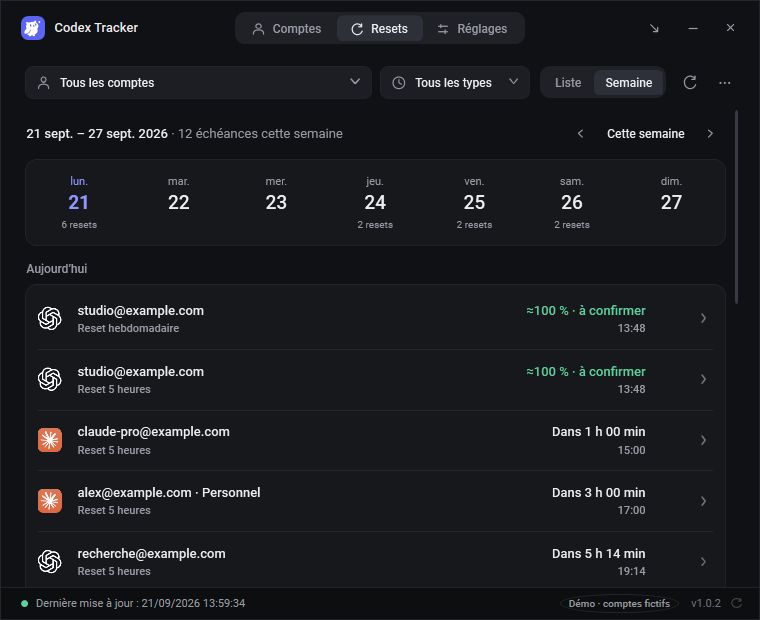
- Lists banked resets for each Codex account with their expiry, in a list or a week view, with those expiring within 3 days at the top.
- Shows a Windows notification when Codex grants a new reset, with its expiry date.
- Reminds you before expiry, by default 3 days, 24 hours, 6 hours and 1 hour before.
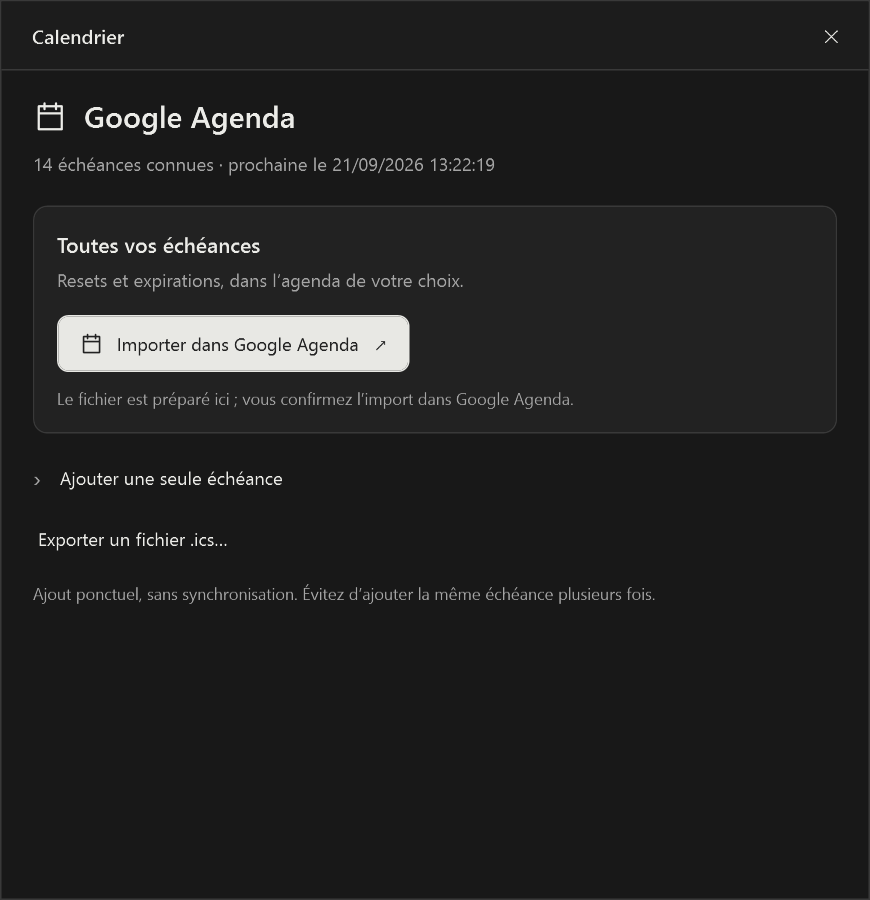
- Can add each reset to Google Calendar with reminders 3 days, 1 day and 1 hour before, and removes the event once a recent reading shows the reset was used.
- Can email you from your own Gmail address, to yourself, the day before a reset expires.
- Advises using one when less than 15% of the week is left on a Codex account and a reset would expire before the next weekly refill.
Never let a Codex reset expire unused
Free for Windows 11, English or French, MIT license. No account and no server.
Download Codex Tracker 1.0.5Frequently asked questions
What is a banked Codex reset?
A free, one-time reset that OpenAI saves to your account for later, including resets earned through referral promotions. Receiving one does not refresh your usage; you choose when to use it before it expires.
When do Codex reset credits expire?
OpenAI sets the expiration for each offer. The date and time are shown with the reset in Usage settings and in the offer. OpenAI support does not extend expiration dates or replace resets that expired.
How do I use a Codex banked reset?
In the desktop app, open Settings > Usage & billing, select the usage summary that shows an available reset, review it and confirm. On the web use Usage settings; in the Codex CLI enter /usage and select Redeem reset. At least one covered allowance must have less than 80% remaining.
Is a banked reset the same as buying a reset?
No. A paid instant reset applies immediately and cannot be saved. A banked reset is free, stored on your account and used when you choose, before it expires.
Can Codex Tracker use a reset for me?
No. Codex Tracker never spends a reset. It lists your banked resets with their expiry, reminds you before they expire and tells you when using one now is worthwhile; you redeem it in Codex.
Related guides
- Codex usage limits: 5-hour and weekly limits explained
- Claude Code usage limits: 5-hour and weekly limits
Sources
- OpenAI Help Center, How resets work in Codex (consulted 1 November 2026)
- OpenAI Help Center, Paid weekly Work and Codex rate limit resets
- OpenAI Help Center, Using Codex with your ChatGPT plan